Back to Collection
Midjourney v6.0
verified safe

MOTION – Deep Red Fashion Campaign - Solo Male – Fashion AI Image Prompt
By SR Prompts Board
May 30, 2026
4 min read
MOTION – Deep Red Fashion Campaign - Solo Male – Fashion AI Image Prompt

Terminal Blueprint & Commands

Prompt Workbench

Select a tool tab to optimize prompt configurations automatically.

// Active target: ChatGPTUTF-8
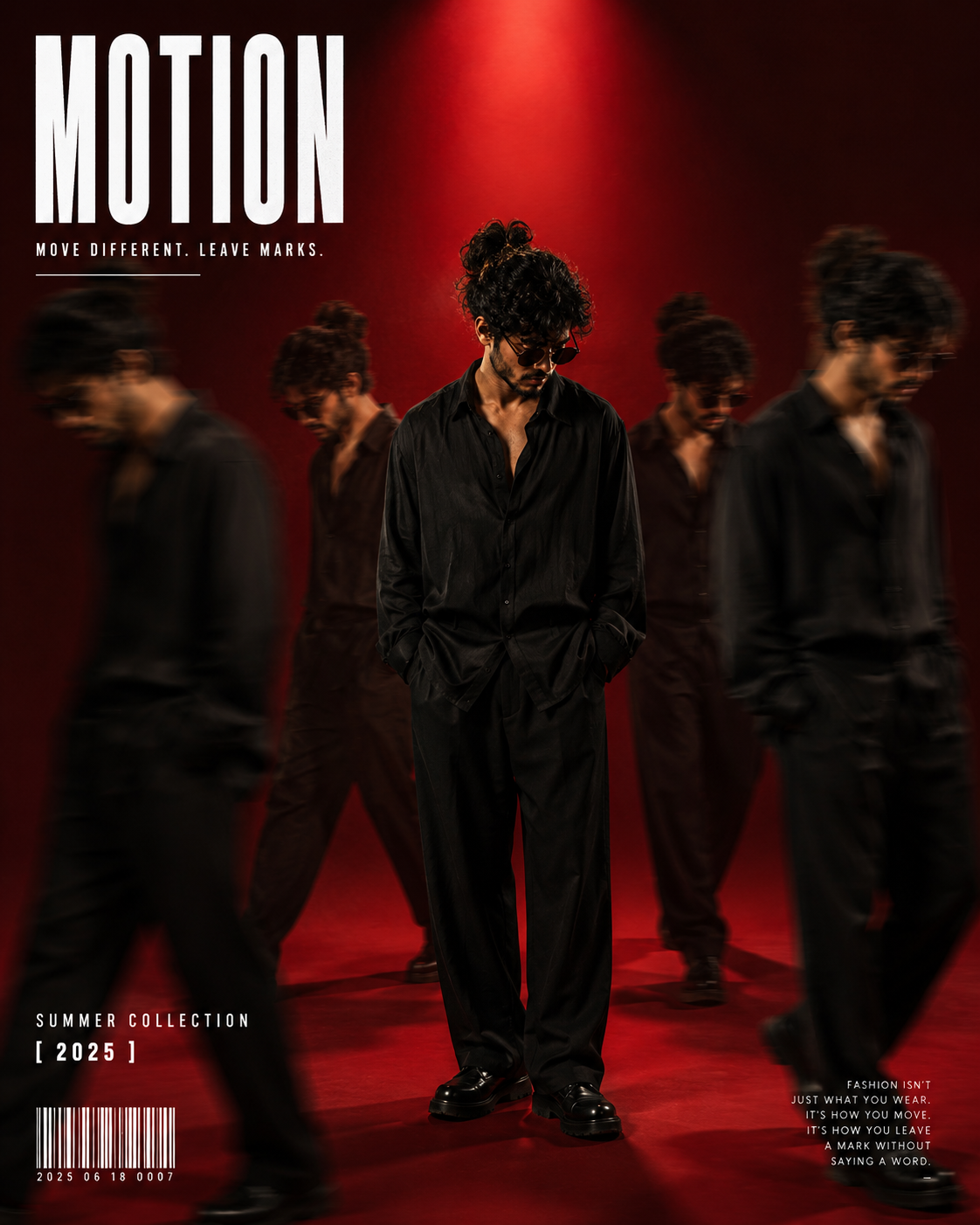
Using the uploaded reference image as the exact face identity source, create a high-end cinematic fashion editorial poster. Background: Deep red gradient studio background with dramatic spotlight lighting. Main subject: Standing at center in an all-black oversized outfit — loose black satin shirt, relaxed black trousers, black shoes, dark sunglasses, full beard, hair tied in a man bun. Serious, intense expression. Head slightly tilted down. Confident, commanding body language. Motion clones: Add 4-5 motion-blur clone versions of the same person walking around the main subject. Realistic motion blur with slight fade. Center figure sharp and fully detailed; side figures progressively blurred and faded. Creates a 'movement through time' premium editorial effect. Typography: Large bold tall white condensed font — 'MOTION' — in the top left corner. Below: 'MOVE DIFFERENT. LEAVE MARKS.' in smaller clean text. Additional minimal elements: 'SUMMER COLLECTION 2025', barcode, small editorial text at the bottom. Color palette: Black, crimson red, deep dramatic shadows. Technical: Sony A7R IV, 85mm lens, cinematic commercial lighting, ultra-detailed, 4:5 ratio.
Presets:

How to use with ChatGPT

Step 1: Setup Workspace

Navigate to chatgpt.com. Select the GPT-4o model option from the dropdown menu in the upper left corner to support reasoning.

Step 2: Paste & Formulate

Paste the copied prompt from above directly into the chat input bar. Customize placeholder text brackets (e.g. `[Subject]`) with your own inputs.

Step 3: Refine Results

If the output needs adjustments, follow up with feedback like: "Add more details on feature X" or "Make the tone slightly more formal".

Pro Tip for ChatGPT:ChatGPT responds best to roleplay constraints. If you customize the prompt, you can add: 'Adopt the style of Steve Jobs' at the beginning to force a specific formatting aesthetic and presentation style.
Advertisement

Editorial Insight

This premium visual asset preset is engineered for Midjourney v6.0. It enables designers, content creators, and AI artists to generate high-fidelity, cinematic image results without having to spend hours guessing style parameters. Use this preset to achieve consistent composition, lighting, and rendering quality across your visual projects.

This high-quality AI prompt is designed for the Solo Male – Fashion category. Pro Tips: Premium fashion concept highly effective for influencer brand building. Title 'MOTION' is swappable.

Calibrated Model Settings

Recommended EngineMidjourney v6.0
Aspect Parameter--ar 4:5
Temperature ValuesN/A (Style weight applies)
Token Length LimitsN/A
Formatting DirectivesHigh resolution PNG/WebP render

Expected Result Output

[Simulated Image Render Output]: - Subject: Photorealistic render of the scene specified in the prompt with crisp edges, visible surface pores, and accurate light reflections. - Lighting: Warm ambient glow mapping with a dramatic volumetric tungsten spotlight casting soft shadows. - Composition: Centered framing with cinematic negative space and shallow depth of field rendering a beautiful soft-focus background. - Resolution & Finish: Clean, noise-free, high-contrast digital photograph style resembling a high-budget movie poster frame.

Workflow Use Cases

Cinematic Wallpapers & CoversCreate dramatic vertical or horizontal aspect ratio backdrops for blogs, books, and profile headers.
Creative Brand Concept MockupsGenerate high-CTR website mockup background art, packaging aesthetics, and advertising graphics.
Gaming & Fantasy Concept ArtProduce ultra-realistic characters, outfit concepts, and virtual assets with consistent style filters.

💡 Creator Tips & Variations

  • Adjust the Aspect Ratio: Customize the end parameters (e.g. use `--ar 16:9` for wide-screen posters or `--ar 9:16` for vertical reels and story covers).
  • Modify Lighting Keywords: Swap 'warm tungsten spotlight' with 'neon cyberpunk glow', 'golden hour sunlight', or 'studio softbox lighting' to change the visual mood.
  • Tune Artistic Liberty: Use the stylize parameter (e.g. `--stylize 250` or `--s 750`) to increase or decrease the engine's deviation from your prompts.

⚠️ Pitfalls & Mistakes to Avoid

  • Adding contradictory styling words (e.g., mixing 'flat 2D vector' with 'ultra photorealistic 85mm photography' in the same sentence).
  • Omitting the aspect ratio parameter, forcing the AI to default to a square 1:1 image which might crop key subject elements.
Advertisement

FAQ & Help

Q. What is the best aspect ratio for this Midjourney v6.0 prompt?

For mobile wallpapers and social media reels, use `--ar 9:16`. For desktop backdrops, blog headers, and YouTube thumbnails, append `--ar 16:9` at the end of your prompt.

Q. Can I use this prompt in other generators like Leonardo or Stable Diffusion?

Yes, the descriptive keywords (lighting, lens, camera angles) work across all major generators. However, Midjourney-specific parameters like `--ar`, `--v 6.0`, or `--stylize` should be replaced with their respective options in other platforms.

Home
Prompts
Articles
Upcoming
About