Back to Collection
Midjourney v6.0
verified safe

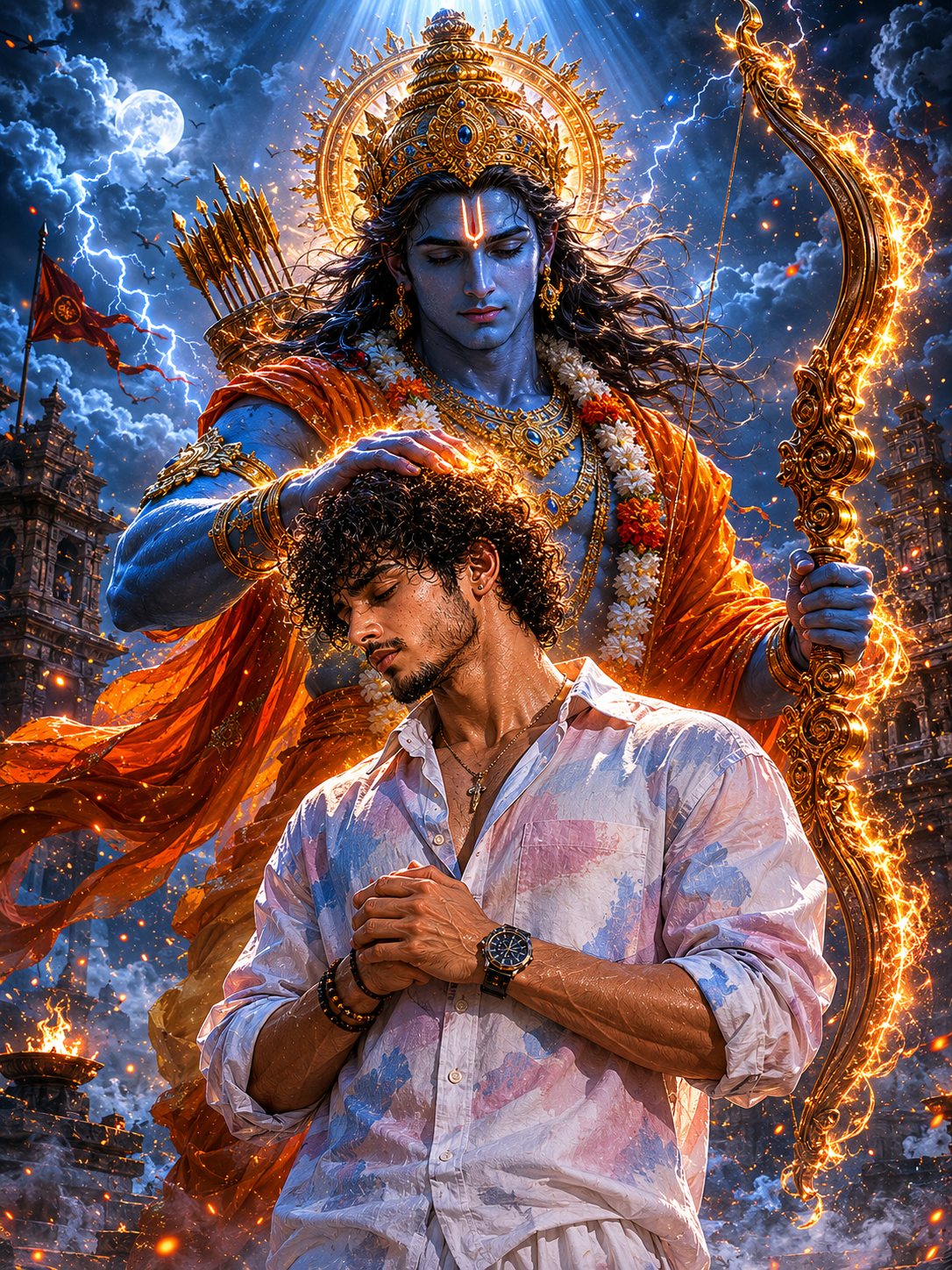
Lord Rama – Divine Blessing Warrior Portrait - Spiritual / Devotional AI Image Prompt
By SR Prompts Board
May 30, 2026
4 min read
Lord Rama – Divine Blessing Warrior Portrait - Spiritual / Devotional AI Image Prompt

Terminal Blueprint & Commands

Prompt Workbench

Select a tool tab to optimize prompt configurations automatically.

// Active target: ChatGPTUTF-8
Create an ultra-realistic cinematic devotional illustration featuring Lord Rama standing protectively behind the uploaded person with a divine blessing gesture — one hand gently placed on the person's head. Uploaded person: Use the exact uploaded face, hairstyle, beard, body structure, and physique. Standing in the foreground with head slightly bowed, eyes downcast, projecting calm warrior energy. Hands joined respectfully or lightly clenched. Hyper-realistic muscle detail, skin texture, sweat, and visible veins. Same outfit as the uploaded image. Lord Rama: Towering, divine presence behind the subject. Glowing blue skin with sharp, powerful facial features. Golden sacred crown with intricate detailing. Glowing tilak on the forehead. Holding a massive divine bow radiating golden fire energy. Flowing saffron/orange royal cloth moving in the divine wind. God-like physique — ultra-detailed, calm yet intensely powerful eyes filled with divine light. Background: Ancient temple ruins with crumbling stonework. Dark storm clouds with visible lightning. Floating burning embers, sacred smoke, moonlight breaking through. Divine white light rays descending from above. Cinematic fog with subtle fire particles. Epic spiritual battlefield atmosphere. Lighting: Dramatic top-down lighting on both figures. High contrast shadows with cinematic depth. Color Grade: Deep blue and gold. Dark blue sky with gold-toned divine glow. Quality: 8K ultra-realistic, masterpiece quality, hyper-detailed. Aspect ratio 3:4. Viral Instagram AI art style.
Presets:

How to use with ChatGPT

Step 1: Setup Workspace

Navigate to chatgpt.com. Select the GPT-4o model option from the dropdown menu in the upper left corner to support reasoning.

Step 2: Paste & Formulate

Paste the copied prompt from above directly into the chat input bar. Customize placeholder text brackets (e.g. `[Subject]`) with your own inputs.

Step 3: Refine Results

If the output needs adjustments, follow up with feedback like: "Add more details on feature X" or "Make the tone slightly more formal".

Pro Tip for ChatGPT:ChatGPT responds best to roleplay constraints. If you customize the prompt, you can add: 'Adopt the style of Steve Jobs' at the beginning to force a specific formatting aesthetic and presentation style.
Advertisement

Editorial Insight

This premium visual asset preset is engineered for Midjourney v6.0. It enables designers, content creators, and AI artists to generate high-fidelity, cinematic image results without having to spend hours guessing style parameters. Use this preset to achieve consistent composition, lighting, and rendering quality across your visual projects.

This high-quality AI prompt is designed for the Spiritual / Devotional category. Pro Tips: Extremely high engagement spiritual content. Customize deity name for variations (Shiva, Krishna, etc.).

Calibrated Model Settings

Recommended EngineMidjourney v6.0
Aspect Parameter1:1
Temperature ValuesN/A (Style weight applies)
Token Length LimitsN/A
Formatting DirectivesHigh resolution PNG/WebP render

Expected Result Output

[Simulated Image Render Output]: - Subject: Photorealistic render of the scene specified in the prompt with crisp edges, visible surface pores, and accurate light reflections. - Lighting: Warm ambient glow mapping with a dramatic volumetric tungsten spotlight casting soft shadows. - Composition: Centered framing with cinematic negative space and shallow depth of field rendering a beautiful soft-focus background. - Resolution & Finish: Clean, noise-free, high-contrast digital photograph style resembling a high-budget movie poster frame.

Workflow Use Cases

Cinematic Wallpapers & CoversCreate dramatic vertical or horizontal aspect ratio backdrops for blogs, books, and profile headers.
Creative Brand Concept MockupsGenerate high-CTR website mockup background art, packaging aesthetics, and advertising graphics.
Gaming & Fantasy Concept ArtProduce ultra-realistic characters, outfit concepts, and virtual assets with consistent style filters.

💡 Creator Tips & Variations

  • Adjust the Aspect Ratio: Customize the end parameters (e.g. use `--ar 16:9` for wide-screen posters or `--ar 9:16` for vertical reels and story covers).
  • Modify Lighting Keywords: Swap 'warm tungsten spotlight' with 'neon cyberpunk glow', 'golden hour sunlight', or 'studio softbox lighting' to change the visual mood.
  • Tune Artistic Liberty: Use the stylize parameter (e.g. `--stylize 250` or `--s 750`) to increase or decrease the engine's deviation from your prompts.

⚠️ Pitfalls & Mistakes to Avoid

  • Adding contradictory styling words (e.g., mixing 'flat 2D vector' with 'ultra photorealistic 85mm photography' in the same sentence).
  • Omitting the aspect ratio parameter, forcing the AI to default to a square 1:1 image which might crop key subject elements.
Advertisement

FAQ & Help

Q. What is the best aspect ratio for this Midjourney v6.0 prompt?

For mobile wallpapers and social media reels, use `--ar 9:16`. For desktop backdrops, blog headers, and YouTube thumbnails, append `--ar 16:9` at the end of your prompt.

Q. Can I use this prompt in other generators like Leonardo or Stable Diffusion?

Yes, the descriptive keywords (lighting, lens, camera angles) work across all major generators. However, Midjourney-specific parameters like `--ar`, `--v 6.0`, or `--stylize` should be replaced with their respective options in other platforms.

Home
Prompts
Articles
Upcoming
About